
Help & Guides
How to use Vektor
A walkthrough, a quick-start checklist, and a full feature reference — captions and screenshots.
Static walkthrough — 10 chapters
No audio · Captions onlyBrowse each chapter at your own pace. Images are from your actual product screens — dashboard, setup, vault, analyze, and billing — so you see the real workflow, not stock photos.
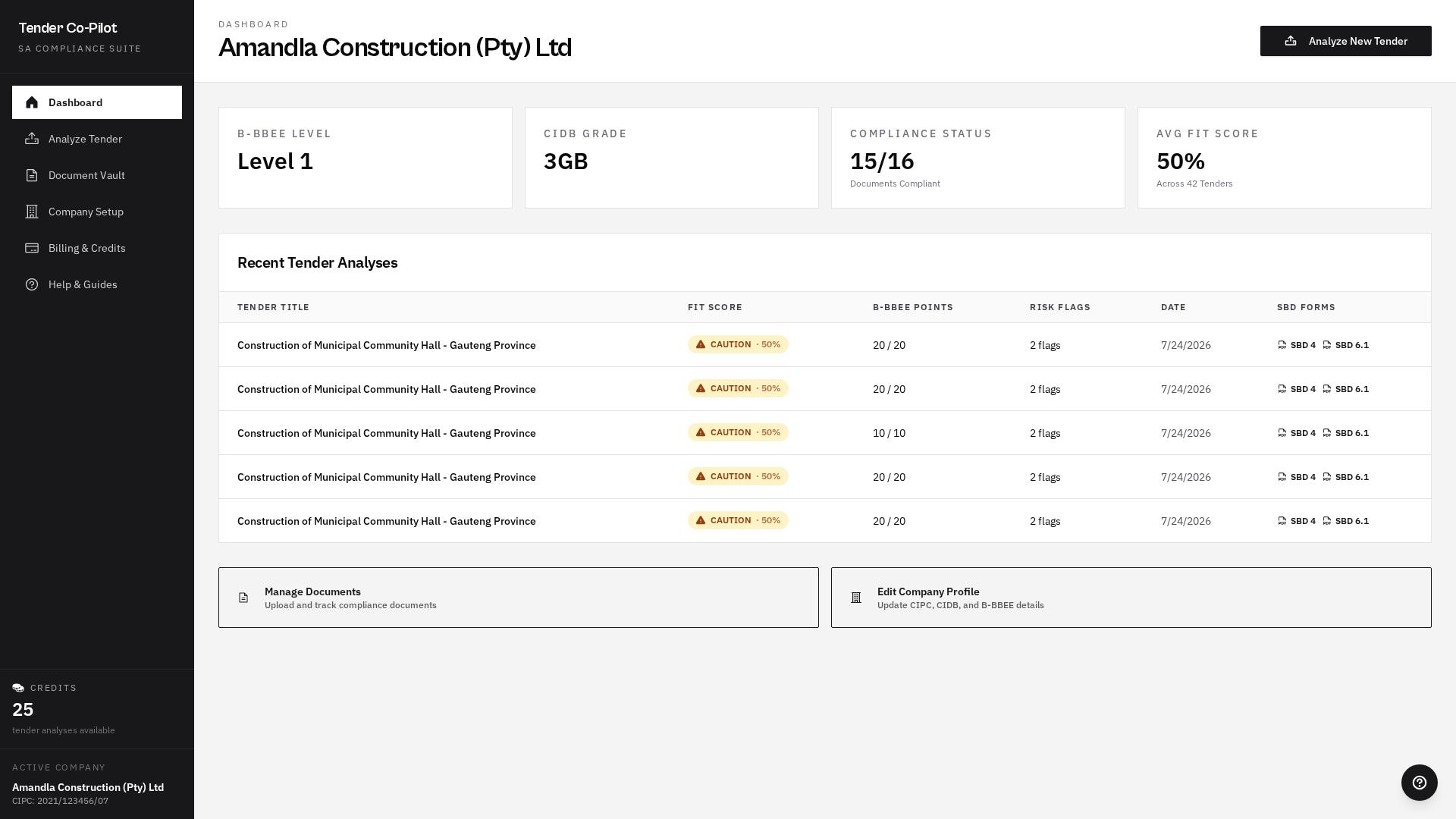
Welcome to Vektor
Your automated compliance co-pilot for South African public tenders.
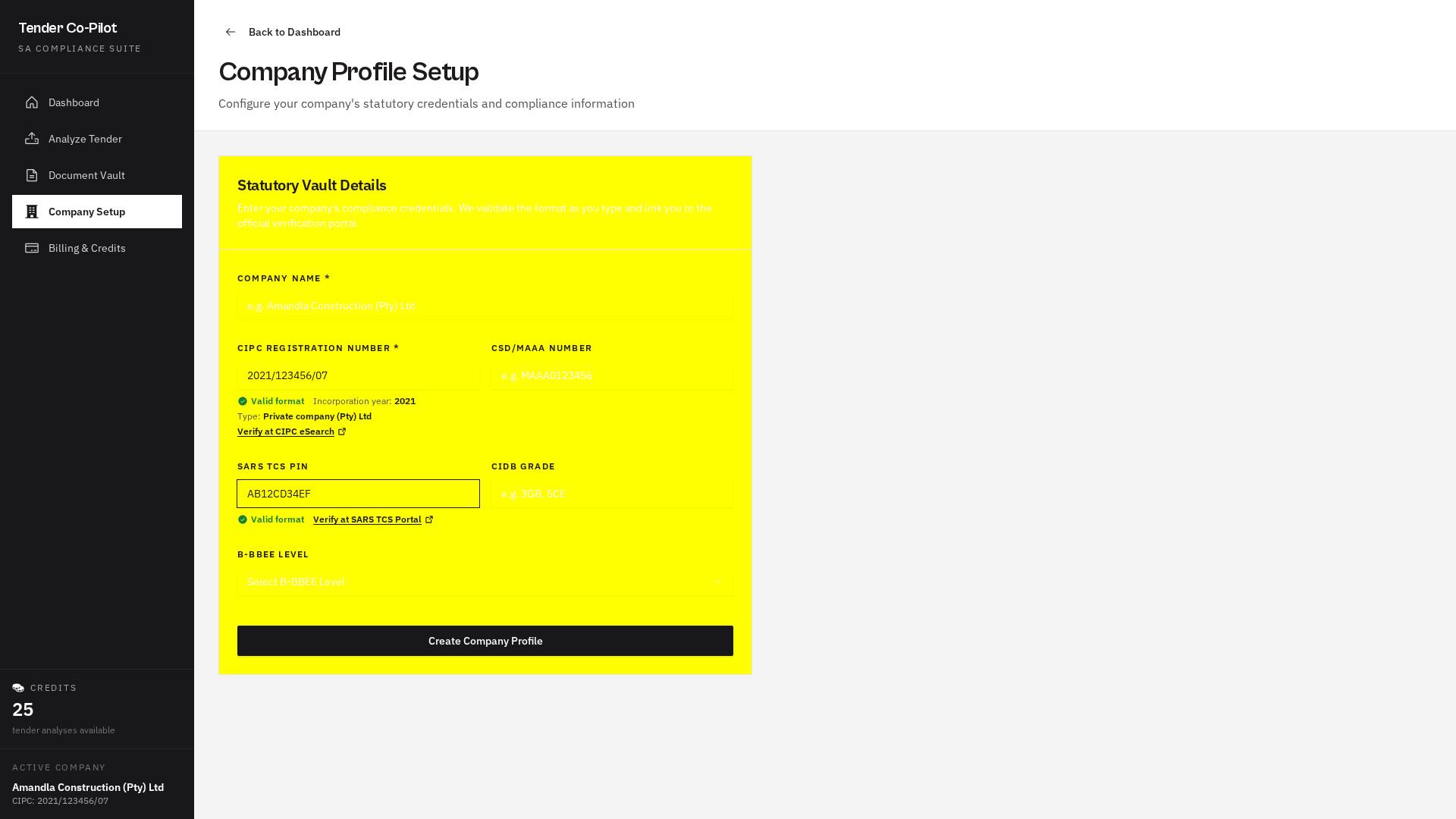
Step 1 — Set up your company
Enter your CIPC, CSD/MAAA, SARS TCS PIN, CIDB grades and B-BBEE level. We validate the format live and link you to the official portals.
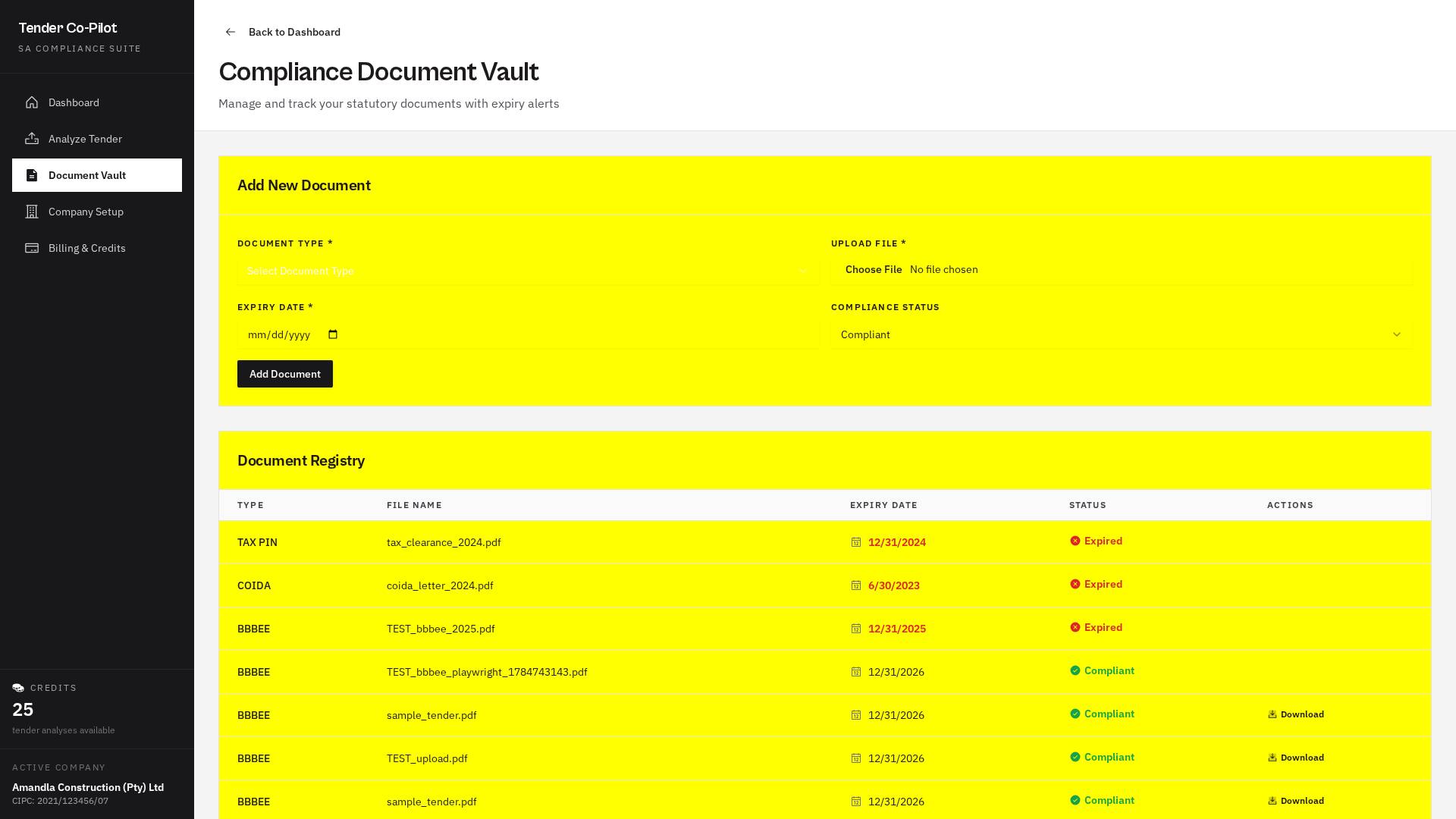
Step 2 — Load your compliance documents
Upload Tax Clearance, COIDA, B-BBEE, your Bargaining Council Letter of Good Standing, and director IDs. We track expiry and flag risks automatically.
Step 3 — Know your Bargaining Council
Every SA construction tender falls under a sectoral council. Civil under BCCEI, electrical under NBCEI, mechanical under MEIBC, and building under a regional BIBC. Vektor warns you if the required letter is missing.
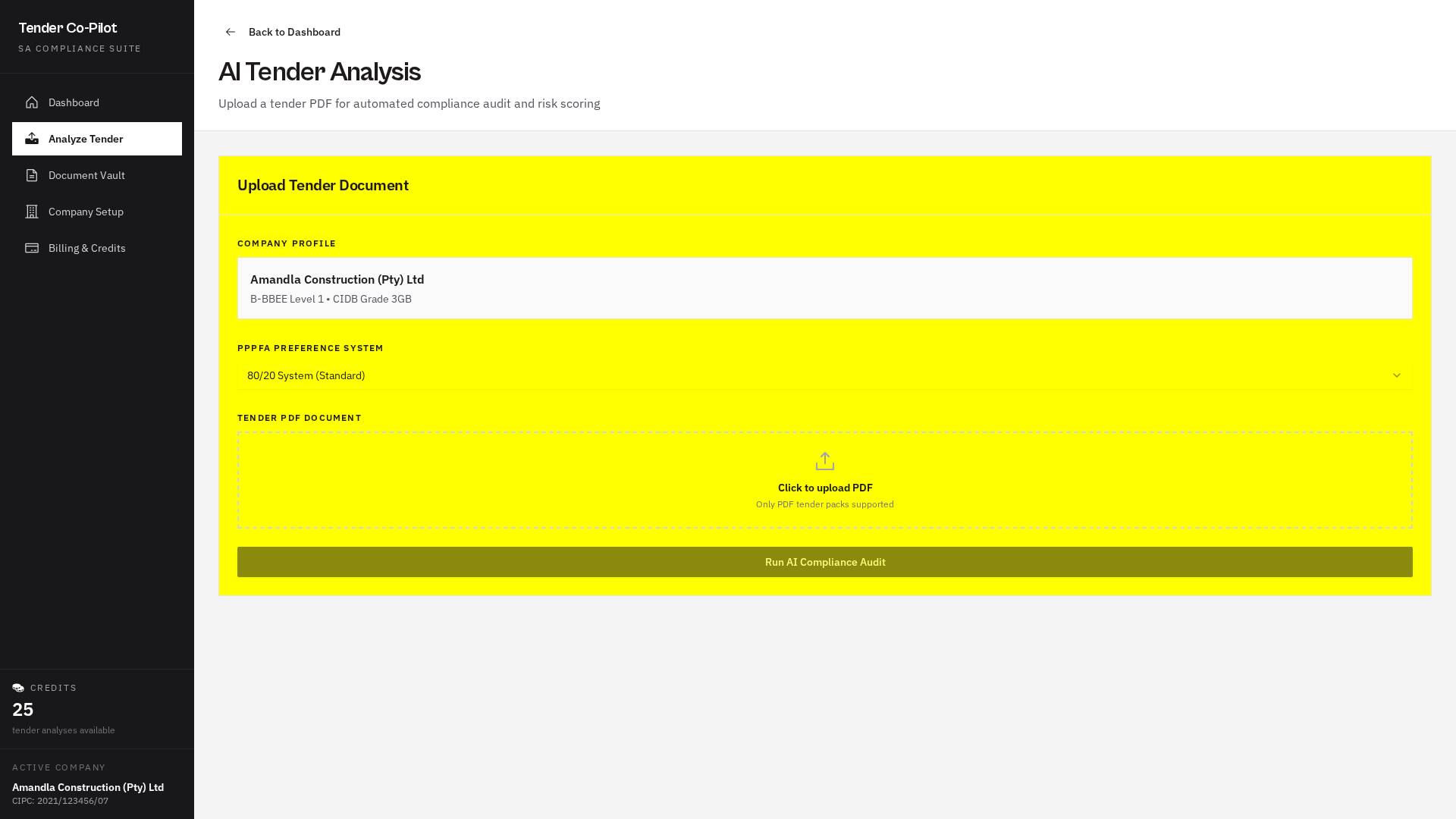
Step 4 — Analyze a tender
Drop in the tender PDF. Our compliance engine extracts the required CIDB grade, closing date, and mandatory returnables in seconds.
Step 5 — Review Fit Score & Go / No-Go
See your fit score, B-BBEE points, and any disqualification risks on a single dashboard.
Step 6 — Auto-fill SBD forms
One-click download of SBD 4 and SBD 6.1 pre-filled with your company vault details, including the authorised signatory name and position.
Track everything in Recent Activity
Every analysis, EFT payment, and referral reward lives one glance away on your dashboard.
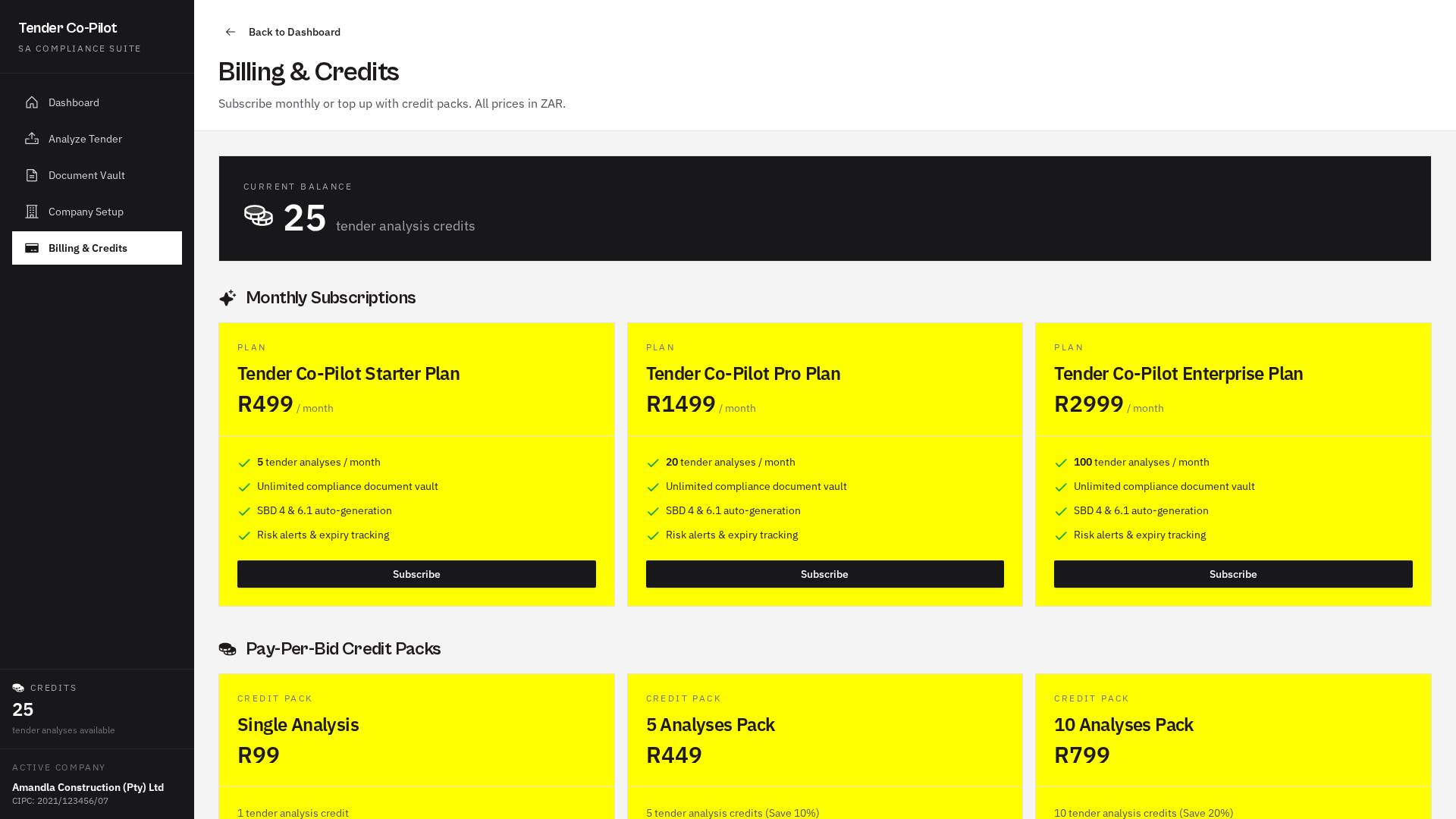
Pay by EFT — no card fees
Start with 5 free credits. Top up with a R149 single analysis or subscribe to Starter, Pro, or Scale.
Earn credits with referrals
Invite a friend. When they upgrade to a paid plan you unlock free credits — up to 10 per referral.
Each chapter pairs a slide with a short caption — read the walkthrough at your own pace.
Quick-start — six steps to first bid
Full feature reference
Company Profile & Statutory Vault
Every South African public tender requires a bidder identity that matches the CIPC, CSD and SARS registers. On the Company Setup screen we validate every statutory field the moment you type:
- CIPC number must match
YYYY/NNNNNN/TT. We derive your incorporation year and entity type (Pty Ltd, NPC, CC, etc.) from the code. - CSD MAAA follows
MAAA+ 7 digits and is case-insensitive. - SARS TCS PIN is 9–10 alphanumeric characters, normalised to uppercase.
Each field ships with an “Open official portal” deep-link so you can cross-verify with the source of truth.
CIPC eSearch — verify company registration ↗ · National Treasury CSD (MAAA) portal ↗ · SARS Tax Compliance Status portal ↗
Document Vault & Expiry Alerts
The Vault stores your Tax Clearance PIN, COIDA Letter of Good Standing, B-BBEE affidavit or certificate, Bargaining Council Letter of Good Standing, and Director ID copies. Uploads are streamed to secure R2 storage. We compute days-to-expiry per document and colour-code anything within 30 days as amber, and anything already expired as red — before the SBD form flags it for you.
Bargaining Council Compliance
Every SA construction tender falls under one or more sectoral bargaining councils. You must be registered and in good standing (levies paid, no compliance findings) with the relevant council or your bid can be disqualified — even when every other document is perfect.
| CIDB Class | Applicable Council | Scope |
|---|---|---|
| CE | BCCEI — Civil Engineering | National |
| EB / EP | NBCEI — Electrical | National |
| ME | MEIBC — Mechanical / HVAC HVAC also needs SARACCA + SAQCC Gas registration | National |
| GB | BIBC (Cape of Good Hope) | Western Cape |
| BIBC (Southern & Eastern Cape) | Southern & Eastern Cape | |
| BIBC (East London) | East London / Border | |
| BIBC (Kimberley) | Kimberley / Northern Cape | |
| BCBI (Bloemfontein) | Bloemfontein / Free State |
Upload your current Letter of Good Standing to the Compliance Document Vault as document type Bargaining Council Letter of Good Standing. Tender analysis will automatically raise a warning when a tender falls under a council but no letter is on file.
Verify CIDB grades at CIDB Registers of Contractors ↗.
Tender Analysis Engine
Drop any RFP PDF onto Analyze Tender. We extract text from the first 20 pages and run it through our compliance engine. You get:
- Tender title, number, issuing entity, and closing date
- Required CIDB grade (e.g. 4GB)
- Every mandatory returnable (SBD forms, Tax PIN, CSD report, etc.)
We then cross-reference against your Company + Vault to compute a Fit Score, B-BBEE points (80/20 or 90/10), and any disqualification risk flags.
Go / No-Go Gauge & Compliance Checklist
The Go / No-Go gauge is a single glance at bid feasibility. It fuses the Fit Score with the returnable checklist — tick each returnable off as you gather it, or upload evidence to auto-verify. Once every item is green, you're clear to submit.
Auto-generated SBD Forms
From any analysed tender you can download SBD 4 (Declaration of Interest) and SBD 6.1 (Preference Point Claim) — auto-populated with your company vault details, ready for signature. More SBD templates (1, 8, 9) are on the roadmap.
Credits & Subscriptions
New companies start with 5 free tender analyses. Each Analyze Tender run consumes one credit. If extraction fails (unparseable JSON, PDF error, timeout), we refund the credit automatically. Top up with a Single Analysis pack (R149) or subscribe monthly — Starter R399, Pro R1 299, or Scale R2 499 — all in ZAR, paid by EFT directly to our bank account (no gateway fees). Payments are facilitated by EcoBuiltConnect (Pty) Ltd via First National Bank; credits are added within 1 business day of verification.